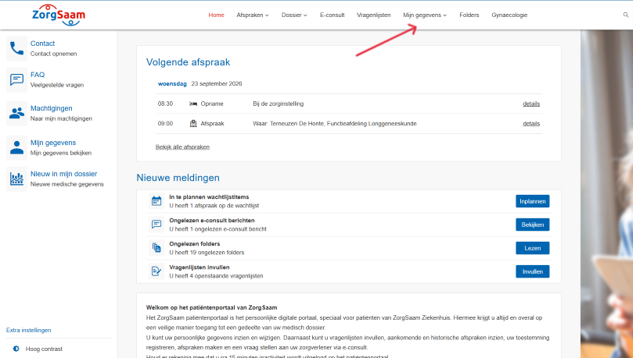
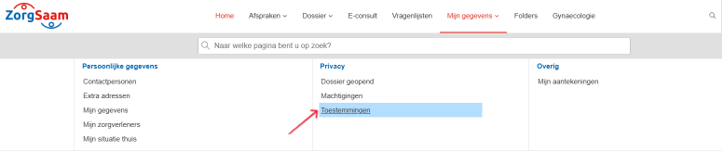
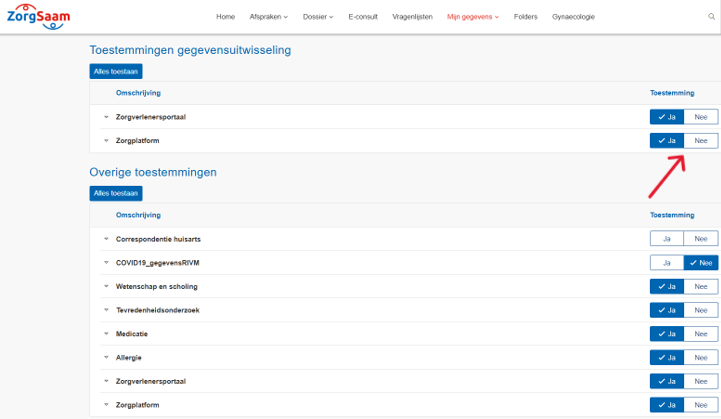
Maison / sujets / Portail patient ZorgSaam / Comment puis-je modifier mes autorisations dans le portail patient ZorgSaam ? Comment puis-je modifier mes autorisations dans le portail patient ZorgSaam ? Lit à voix haute Translate Imprimer Partager WhatsApp E-mail Les étapes en bref Log in op het Portail patient ZorgSaam. Allez à '‘Mes détails‘. Bekijk en wijzig uw toestemmingen. 1. se connecter Lisez les explications concernant la connexion via Internet. 2. Accédez à vos coordonnées Cliquez sur ´Mes détails´. Agrandir 3. Uw toestemmingen bekijken en aanpassen Cliquez sur ´Toestemmingen´. Agrandir Klik bij iedere toestemming op ‘Oui’ of ‘Non’ om uw keuze aan te passen. Agrandir Questions fréquemment posées sur le ZorgSaam Patiëntenportaal Comment démarrer une consultation vidéo via le portail patient ZorgSaam ? Comment puis-je me connecter au portail patient ZorgSaam ? Comment prendre rendez-vous sur le portail patient de ZorgSaam ? Comment puis-je consulter mon rendez-vous sur le portail patient de ZorgSaam ? Comment puis-je reporter ou annuler mon rendez-vous sur le portail patient de ZorgSaam ? Comment puis-je demander le renouvellement d'une ordonnance via le portail patient ZorgSaam ? Comment puis-je télécharger mon dossier médical depuis le portail patient ZorgSaam ? Comment puis-je démarrer une téléconsultation via le portail patient ZorgSaam ? Comment remplir un questionnaire via le portail patient ZorgSaam ? Comment puis-je mettre à jour mes informations sur le portail patient ZorgSaam ? Comment puis-je donner à quelqu'un l'accès au portail patient ZorgSaam ou consulter le dossier de mon enfant ? Comment puis-je consulter mes autorisations sur le portail patient ZorgSaam ?