You can try the following:
- Check the spelling
- Try another search

Het patiëntenportaal MijnSaxenburgh is ook als app beschikbaar.
The advantage of the app is that you only need to log in once with your DigiD.
Then you log in with a login code that you have set up yourself.
The app you need to download for this is HiX Patient.
If you have an Android phone (Samsung, Google), you do this via the Google Play Store:
HiX Patient for Android
If you have an iPhone or iPad (Apple), you do this via the App Store:
HiX Patient for Apple
Download en installeer de Hix Patiënt app op uw apparaat.
If you have an Android phone (Samsung, Google), you do this via the Google Play Store:
HiX Patient for Android
If you have an iPhone or iPad (Apple), you do this via the App Store:
HiX Patient for Apple
Na het installeren van de app opent u deze.
U krijgt nu de mogelijkheid om een persoonlijke code in te stellen.
Deze code gebruikt u in het vervolg om in te loggen in de app.
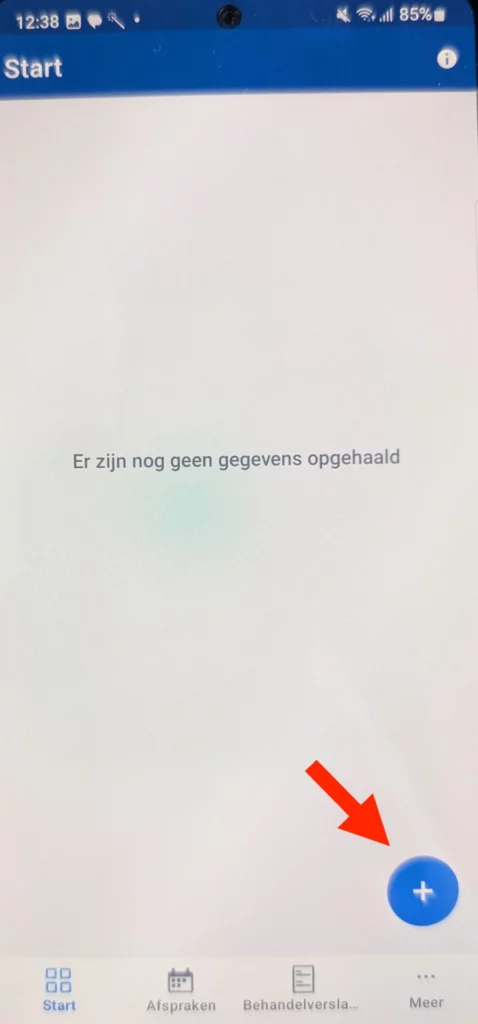
Er opent nu een bijna lege pagina. Klik op het plusje rechts onderin.
Nu kunt u de QR code scannen die u van uw behandelaar heeft gekregen.
De QR code staat ook hier onder.
Klik hierboven op ‘Vergroot’ om de hele QR code te zien.
Log eenmalig in met uw DigiD op het patiënten portaal van Ziekenhuis Saxenburgh.
Druk op ‘Activate'.
Kies ‘Open’ bij de vraag ‘Deze pagina openen met Patiënt?’ .
U kunt de volgende keer inloggen met de persoonlijke code die u bij stap 2 heeft ingesteld.
Druk op het logo van Ziekenhuis Saxenburgh om naar uw online dossier te gaan.