Ga naar de homepagina
The text on this page is translated automatically. Show in original language

How do I make an appointment for a blood test?

  • You can a appointment for blood test make via MyZGV.
  • Do you have staff required when making an appointment for a blood draw, at your request GP?
    Then please contact the Dicoon Customer Contact Center via phone number: 085 0500 502.

Steps in brief

  • Log in to MyZGV of DigiD.
    – Or call the Dicoon Customer Contact Center: 085 0500 502.
  • Click on '‘Make an appointment’ 
  • Choose the appointment.
  • Choose a day, location, and time.
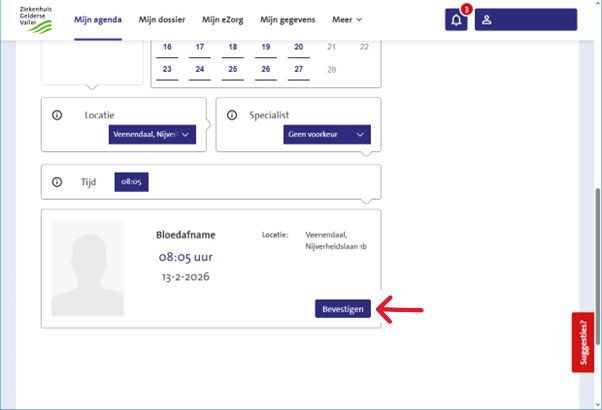
  • click on 'To confirm'

1. login

2. Going to the appointments

  • After logging in, you will arrive at the homepage.
  • There are then two ways to on the appointment page to come:
    1. Click below ‘My actions’ on '‘Make an appointment‘'.
    2. Click on '‘Agenda’ and then on '‘Appointments to be scheduled‘'.

3. Make an appointment

  • click on ‘'Appointment to make'’.
  • As a specialty, it states '‘Clinical Chemistry’This is normal.

Choose date and location

  • Choose a day for the appointment.
  • Choose a location.
  • Not every location is open every day.
  • Select at Specialist: Blood sample.

Choose time

  • Scroll down
  • Choose a time.

4. Confirm appointment

  • Check the appointment details.
  • Click on '‘To confirm‘'.