Ga naar de homepagina
The text on this page is translated automatically. Show in original language

How do I request a repeat prescription via MijnMeander?

You can in MyMeander An request a repeat prescription. This can be up to 120 days after your last appointment at the outpatient clinic.

Steps in brief

  • Log in to MyMeander.
  • Go to '‘Medicines‘'.
  • Request your repeat prescription.
  • Check the status of your application.
  • Pick up your medication when it is ready.

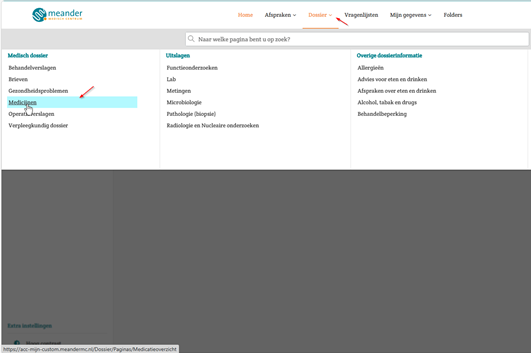
2. Go to your medicines

  • Click on '‘File‘'.
  • Click on '‘Medicines‘'.

3. Request your repeat prescription

  • Click on '‘Request a repeat prescription‘'.

  •  Select the correct outpatient clinic. After that, you can send a message regarding your repeat prescription.

4. Check the status of your medication

  • Click on '‘Requested repeat prescriptions‘'.

  •  Here you can view the status of your application.

  •  You can edit your message as long as the healthcare provider has not yet read it.
  • You will receive within 5 working days Notify you when your specialist has approved your application.

5. Receive your medication

Your specialist sends the prescription to the pharmacy you have chosen.
  • This can be your own pharmacy.
  • You can only obtain some medicines from the Meander Pharmacy.
  • It may take a few days for your medication to be ready.
  • You will be notified when your medication is ready.
